Choose an Evade script for the part of the round you want help with: farming, finding players or managing movement and revives. Browse the listed features, compare key requirements and device notes, then copy the code immediately or download the same Lua file from its script card.
Kings Hub is a free Evade script focused on movement, with adjustable flight speed, noclip, infinite jumping, bhop, and separate sliders for run speed, jump power, and hip height. Its ESP includes players, monsters, downed teammates, and collectible items, with boxes, names, tracers, rainbow highlights, map tools, and server options. Version 2.15.23.
LightningWare is a keyless Evade hub with a side menu and numeric controls for movement, including strafe acceleration, FOV, and regular or boosted bounce power. It also includes auto-farming, action tools, visuals, window customization, config saving, and event-content farming when events are active.
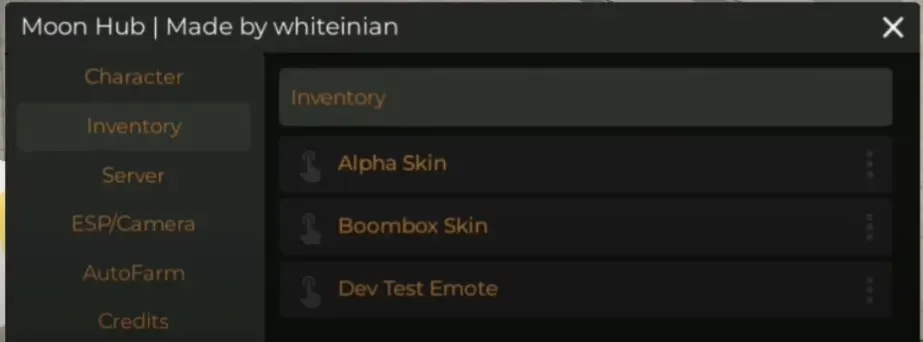
Moon Hub by whiteinian takes a different route in Evade by focusing on the inventory first. Its menu lets you grant skins and emotes, including test items, while also offering character, server, ESP with camera support, and auto-farm sections in a clean six-item layout.
SZ Hub is organized into four tabs: Player, Automation, ESP, and Misc. Adjust speed, CFrame movement, jump power, and gravity, use auto bhop on PC or mobile, activate God Mode, instantly revive teammates, and brighten the entire map with Full Bright.
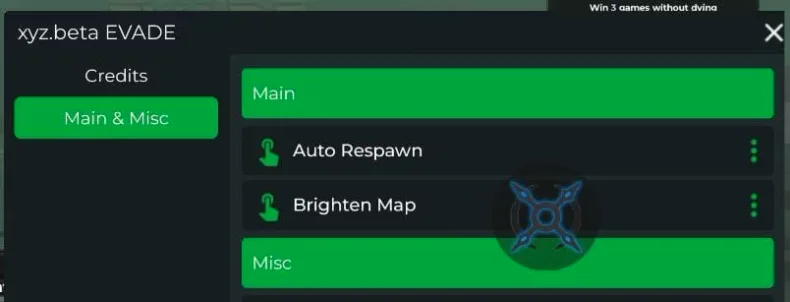
xyz.beta is a compact two-feature hub for Evade: Auto Respawn brings your character back right after a fall, while Brighten Map reduces the darkness that can make nextbots hard to spot in time. Its green menu has Main and Misc sections, with a quick launch and no complicated setup.
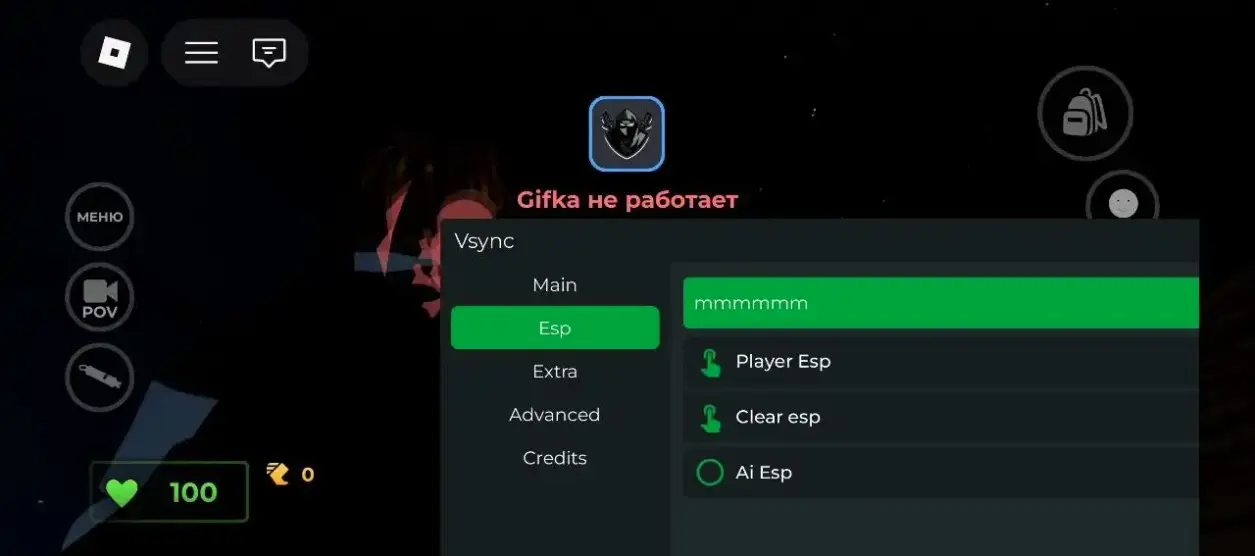
vsync is a keyless Evade script for Roblox with ESP, auto farm, flight, speed boosts, infinite jumps, and noclip. It works on both PC and mobile devices.
In Evade, an open passage can become a chase route as soon as a Nextbot turns the corner. Players need to notice the route, manage movement and decide when helping a teammate is possible. This guide connects those round decisions with the labels you will find in third-party script descriptions. The catalog above keeps the actual code beside each entry, so you can compare a particular tool before choosing how to obtain it.
Evade Scripts for Roblox: Pick the Tools You Need
What Each Evade Script Changes
Start with one task. If your difficulty is noticing where a teammate has fallen, a movement slider will not answer the same question as a player marker. If your goal is understanding a repeated farming routine, begin with its description rather than the number of buttons in its menu. A smaller menu with a clearly described action is easier to evaluate than an impressive name with no explanation.
Searches such as Evade Cheats or Evade Hack often refer to these same third-party tools. The search wording does not grant extra game permissions or establish that an entry works. Read the function, its intended target and its access requirements together. The catalog’s task filters organise reviewed descriptions; All scripts remains the complete starting point, including entries that have not yet been assigned to a group.
The task you want help with during a round.
The exact feature and target described in the card.
Key requirements for the script separately from the executor.
Device notes that match the setup you actually use.
Surviving Nextbots and Helping Your Team
Rounds, Routes and Downed Players
Evade is the Roblox experience by Hexagon Development Community, built around parkour and surviving pursuing Nextbots. Route choice matters because a clear view in one direction says little about the corner behind you. Look for space to turn, where a staircase leads and whether another player is drawing a pursuer along the same passage. Staying aware of teammates also helps you judge when to approach someone who is downed.
Ordinary controls and script options belong to different layers. The official game description lists E for interaction, C or Ctrl for crouching and T for whistling. A third-party menu may add its own controls, which should be read separately. There is no single keyboard instruction that can safely stand in for every script, touchscreen layout and future game revision. Learn the game’s visible prompts first, then compare what the selected tool actually changes.
Match the feature to a round task
Feature
Player task
Useful distinction
Auto Farm
Repeat a described routine
The repeated action and reward conditions depend on the entry.
ESP
Read relevant positions or labels
Player markers and nextbot markers are separate capabilities.
Speed / movement
Adjust a described movement option
A setting is not a guarantee that every route or obstacle becomes easy.
Auto Revive
Perform a specified revival-related action
Teammate assistance, self-revival and respawn are different targets.
Evade Auto Farm Scripts: Rounds and Rewards
What Auto Farm Means in Evade
Auto Farm describes automation of a routine. To understand an entry, identify the repeated action, the point at which it begins and the conditions that end it. A routine could depend on a live round or on a particular character state; the author needs to explain the scope. The label by itself does not identify a currency, an hourly income or a route that works in every mode.
During a round, distinguish movement from reward conditions. Reaching a location, remaining active and qualifying for a reward are different events. If a description only promises repeated movement, it has not also established how the game awards progress. A useful comparison asks whether the routine follows the current round, what happens after a reset and whether other menu options interfere with it. Read the dedicated farming guide for a more detailed way to compare those conditions.
ESP: Locate Players and Read the Map
Labels, Distance and What the Menu Shows
An ESP display presents information through markers, labels or outlines described by its author. Player ESP can help identify a person; Nextbot ESP concerns pursuers. Those are separate targets. A menu may offer one, both or additional information, and the exact listing is the place to establish that difference. Distance labels and name tags are also distinct details rather than automatic parts of every ESP option.
Readability changes how useful the display feels. Too many bright markers can hide a stair edge or make it harder to follow the route itself. Begin with the one target you need and consider label size, overlap and contrast. A marker supplies information; the player still has to choose a route and time an interaction. Seeing someone through an obstacle is not evidence that an interaction can reach through that obstacle.
Evade Auto Revive and Team Support
Reviving and Carrying Players in Evade
Helping a teammate involves several decisions: finding them, approaching without bringing a pursuer directly onto them, and using the action the game currently permits. Carrying moves another player, while reviving aims to restore that player to an active state. These actions can support one another, but their outcomes are different. A rescue description should say which action it automates and who receives it.
Auto Revive needs an explicit target. Assistance to someone else is different from self-revival, and both differ from a respawn. The official game description mentions vouchers for quick revives and respawns; a script label does not establish a way around those game conditions. When comparing an entry, look for the target, activation conditions and stopping behaviour. An option that only changes a prompt or approaches a teammate should not be interpreted as guaranteed revival at any distance.
Speed, Jump and Movement Controls
Choose Comfortable Settings for Running and Turning
Movement is a sequence of turns, jumps and route decisions. Speed describes a movement-related adjustment, Auto Bhop or Bunny Hop concerns repeated jumping, and Teleport describes a different kind of position change. Their names do not identify a shared implementation. Compare each option on its own terms rather than assuming that a movement category makes every obstacle easy.
A comfortable setup leaves the route visible and the important controls reachable. On a narrow touch display, a large menu can cover the area where you turn; on a desktop, a shortcut can conflict with a game control. There is no universal best number for every map or device. Change one described setting at a time so you can tell which change affected steering, jumping or the visibility of the next passage.
Evade Scripts on Android, iOS and PC
Choose an Executor for Your Evade Setup
Android users can read the catalog, copy the visible source and save a Lua file through their browser. Running that file requires a separate tool whose particular build supports the intended environment. Touch controls introduce a second question: whether the menu fits the screen and leaves room for the game. Browser support alone answers neither of those questions.
On iPhone and iPad, the same website actions remain available in a capable browser. Installing Roblox on iOS does not establish support for a third-party executor. Windows users should compare the actual Roblox client, executor build and script revision as one setup. Names such as Delta, Xeno and Solara are useful for identifying a tool, but their names alone do not prove a platform, a download package or compatibility with the selected script. Use the device guide to separate those checks.
Separate getting the code from running it
Device
On this website
Before running a script
Android
Read cards, copy code or download Lua in a supported browser.
Match the particular executor build and script to documented Android support.
iPhone / iPad
Read the same catalog and use available browser copy/download controls.
Roblox on iOS does not itself establish executor or script support.
Windows PC
Use keyboard/mouse, Copy and the Lua download route.
Check the actual Roblox client, executor build and script revision together.
No Key, Copy and Lua Download
Copy Immediately or Download After 15 Seconds
No Key concerns the selected script’s documented access process. An executor may have a different key requirement. Keeping the two separate prevents a common misunderstanding: copying source freely from a website does not remove the conditions of the software used to run it. The No Key filter includes only entries explicitly marked that way.
Copy and Download provide two ways to obtain the same selected source. Copy attempts to place the visible string on your clipboard immediately after your click. Download opens a separate page with a fifteen-second wait checked by the server. Saving a .lua file is useful when you want to retain source as a file, but the download does not execute it. If the source changes during that wait, begin a new download so you know which version you are receiving.
Find the right card and read its feature and key notes.
Press Copy for the visible code, or Download for a Lua file.
On the download page, wait until the server-checked 15 seconds finish.
Save the file; if the code changed, explicitly restart the new-version download.
Why an Evade Script Stops Working
Find the Failing Step in Your Evade Setup
Locate the failing step before changing anything. A clipboard permission problem occurs in the browser. A downloaded file that cannot be found is a file-management issue. A missing menu after execution involves the external execution environment, while one nonresponsive feature can have a narrower cause. These symptoms call for different information and different next steps.
For copying, select the visible code manually if the browser refuses clipboard access. For downloading, return to the same waiting page and check whether the file is ready or the source has changed. For an external menu problem, record the script name, device, tool build and the exact symptom without sending passwords or access keys. A new date on a web page does not repair a changed game function; compare actual revisions and use the help guide to organise the report.
Evade Scripts FAQ
Questions About Evade Auto Farm, ESP and Keys
These answers explain the choices that visitors most often need to make before obtaining source. They describe website behaviour and the meaning of common labels. Specific functions remain attached to the entry that describes them, so a farming explanation should not be read as a promise about every menu in the catalog.
Which Evade script should I choose first?
Start with the part of the round you want help with. A farming routine, an ESP display and a movement tool serve different purposes. Compare the actual functions in each card, then its key requirements and device notes. Choose a specific documented feature rather than assuming that a large menu includes everything.
What does Auto Farm do in Evade?
Auto Farm is a label for a script’s repeated routine, not one fixed feature built into every listing. A description should explain what it repeats and how it relates to the round. Read that scope before choosing it. The label alone does not establish a particular reward, a currency amount or an uninterrupted session.
What is the difference between ESP and Auto Revive?
ESP presents information such as the positions or labels described by that particular script. Auto Revive refers to a revival-related action, whose target must be explained separately. Seeing a downed player does not revive them, and a teammate-revive option is not the same as self-revival. Pick the function that matches the task you want.
Does No Key apply to the executor too?
No Key describes the selected script’s own key requirement when that status is documented. The executor may use a separate access process. Compare the two independently. You can copy code from this site immediately, but that does not change the requirements of any third-party tool used to run it.
Can I use Evade scripts on Android, iOS and PC?
The answer depends on the particular script and executor build. The site itself provides readable cards, Copy and Lua downloads on supported mobile and desktop browsers. Running the script is a separate question. Use the device guide and the selected entry’s current platform notes; a touch-friendly menu alone is not proof of compatibility.
Why does Download wait when Copy is immediate?
Copy places the visible script on your clipboard right away. Download opens a separate page and makes the Lua file available after a 15-second server-checked wait. Both refer to the selected script. If its code changes while you wait, the page asks you to start a new download instead of silently giving you different code.